


Gallery
4.18.29K Reviews
App Specs
- Version
- 3.0.0
- Updated On
- License
- Free
- Downloads
- 10,000,000+
- Developer
- Gallery Photos & Videos
- Categories
- Productivity
- Platform
- Android
Screenshots
 Analysis by AppCompare
My main reason to try Gallery was simple: I wanted a quicker way to browse the photos and videos already on my phone, without turning that everyday task into a project. In use, its appeal is clearest when I want to open a recent picture, scan older memories, or keep visual files together in one familiar place. The app is free to install, so it is easy to test without committing to a purchase; whether its extra options are worth paying for depends on what I actually need from a mobile gallery.
What free access means in practice
Gallery is a free productivity app from Gallery Photos & Videos, with in-app purchases listed from $2.49 to $27.99 per item. I would treat those as optional spending rather than assume they are necessary for basic browsing. If all I want is to view photos and videos on my phone, the free starting point is the useful part of the offer. Before buying anything, I would check what that specific purchase unlocks and whether it solves a problem I have; a price range by itself is not enough reason to spend.
That distinction matters because many phones already include a gallery app at no extra cost. Gallery has to earn a place beside that built-in option through a viewing experience or workflow I prefer, not merely because it can display images. I would begin with ordinary tasks—finding a recent photo, looking through a folder, or opening a video—and only consider paid extras if I repeatedly run into a limitation that matters to me.
A practical fit for everyday photo browsing
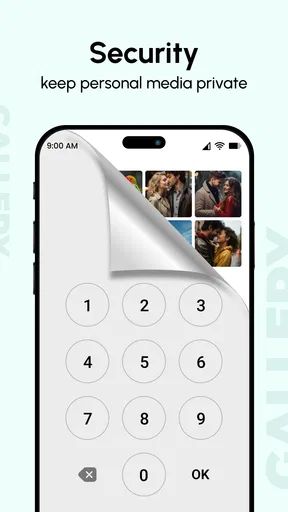
A separate gallery can be useful when the default photo app feels busy, is tied closely to a cloud service, or makes local files harder to browse than they should be. Gallery is aimed at viewing photos and videos stored on the phone, and its focus is appealing if I want a straightforward place to look through that collection. It may also suit someone who shares a phone occasionally and wants a more deliberate way to handle private images, though I would first test how its hiding option works rather than assume it provides a particular level of protection.
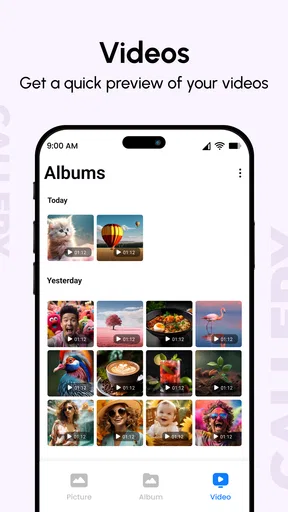
For example, after a family gathering I might want to find a short video among many new pictures, show a few selected images to a relative, then put more personal files out of casual view. A dedicated gallery can make those steps feel more contained than searching through a general file manager. The practical tip is to try the app with a small, familiar set of photos first: check how you reach albums and videos, how easy it is to return to the full collection, and whether the hiding workflow fits your habits before moving anything important.
Where it sits beside the usual alternatives
The main alternative is the gallery already installed on the phone. That option usually wins on convenience because it is already there and may connect naturally with the phone’s other photo tools. A cloud-focused photo app can be a better fit for someone who wants online backup, sharing, or access across devices. A file manager, meanwhile, offers more control over folders but is usually less pleasant for browsing pictures as a visual collection.
I would choose Gallery when I want a focused viewer and its local browsing suits me better than the default. I would stay with the built-in app if it already handles albums and videos comfortably, or choose a cloud-oriented service if keeping a remote copy is the priority. Those are different jobs: a phone gallery is not automatically a backup system, and I would not rely on a hide feature as a substitute for a secure backup or a carefully chosen privacy tool.
Worth Reading Before You Choose

Flipboard Shows What News Apps Must Do Beyond the Feed

Switching to Android Auto Means Rethinking Your Driving Routine

Google Calendar Makes a Crowded Week Easier to Manage

Ludo King Makes the Most of the Minutes Between Plans

Baby Panda World Brings Quick Play to Modern Phones, but Its Game Library Feels Busy

ESPN’s Live Game View Makes Following Close Games Easier
One useful habit is to separate “easy to find” from “safe to keep.” A gallery helps with the first; for the second, I would maintain a backup through a method I trust and avoid treating a hidden item as protected against every kind of access. I would also test whether changes made while browsing remain consistent with the way I normally organize files, especially if I switch between more than one photo app. That small trial can prevent confusion later.
Using Gallery day to day
So, I recently got my hands on the Gallery app, and let me tell you, it’s like having an art museum in your pocket. If you’re someone who loves organizing photos or just enjoys a visually stunning interface, you’re going to want to hear about this.
First Impressions
When I first opened the Gallery app, I was immediately struck by its clean design. It’s got this sleek, modern look that makes navigating through your photos a breeze. You know how some apps just feel clunky? Not this one. It’s smooth, and everything is exactly where you’d expect it to be.
Features That Stand Out
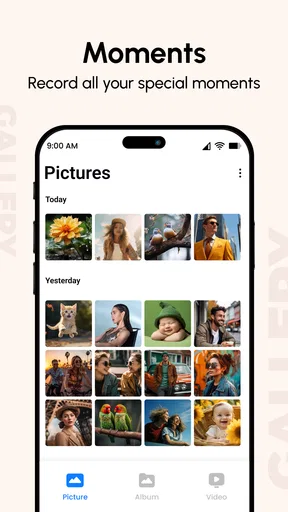
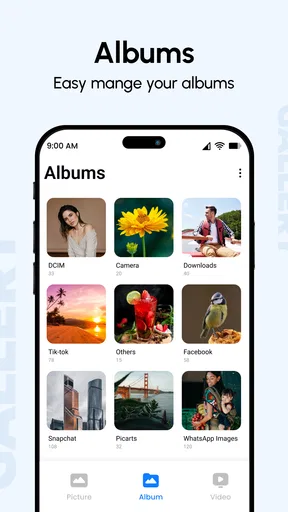
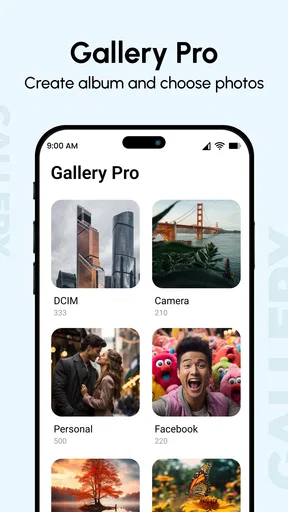
One of the coolest features I found is the way it organizes photos. You can sort them by date, location, and even by the people in them. It’s like having a personal assistant who knows exactly where you stored those vacation pictures from two years ago.
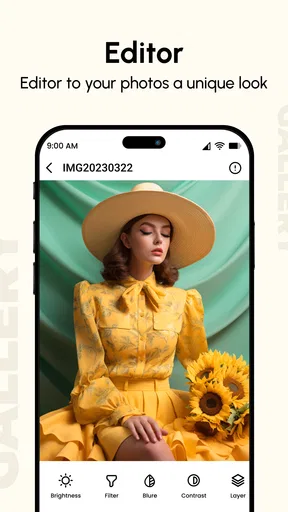
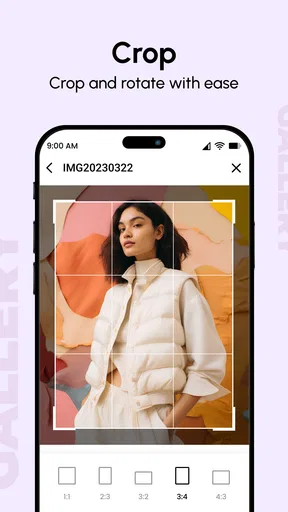
Oh, and the editing tools! They’re surprisingly robust for an app that’s primarily a gallery. You can tweak brightness, add filters, crop, and more. It’s like having a mini Photoshop right on your phone. No need to switch between different apps anymore.
The store’s short label is simply “Gallery,” and that plain naming fits the app’s narrow purpose: opening and browsing a phone’s visual library. Its 4.2 average from around 89,000 ratings, alongside roughly 7,500 written reviews, suggests that plenty of people have tried it, though popularity alone does not tell me whether it will suit my phone or habits. I would use those figures as context, not as a promise that every feature behaves identically for everyone.
Small checks that prevent everyday frustration
When trying any gallery app, I find it useful to search for a few known items instead of judging it only by the first screen. Pick an old screenshot, a video from a recent outing, and a photo you know is stored in a particular album. That quick test tells me whether the app’s way of grouping material matches how I remember it. If I often think in terms of dates, folders, or people, I can see whether the relevant organization is genuinely helpful in my own collection rather than assuming every sorting method will be equally useful.
I would also make a distinction between browsing and editing. A quick crop or brightness adjustment can be convenient in the same place I view an image, but it does not necessarily replace a dedicated editing app when I need careful retouching, layers, or a repeatable style. For casual fixes before sharing, an in-gallery tool can save a trip between apps. For a photo I care about preserving in a particular way, I would keep the original and use a more specialized editor if the result needs precision.
That is a practical trade-off: the fewer apps I need to open for routine tasks, the smoother the moment feels, but a gallery is not automatically the best tool for every image job. I would try an edit on a nonessential picture first and check the result before applying the same approach to a whole batch. That gives me a feel for whether the controls are quick enough for casual use and avoids turning a simple browse into an unwanted editing session.
The hiding option deserves the same careful trial. If I want to keep an image out of a casual scroll, I would test the process with a file I can easily find again and confirm how I restore it. That is more useful than moving a large collection immediately and later wondering where it went. For especially sensitive material, I would choose a protection method based on its actual safeguards, not on the reassuring sound of a feature name.
Compatibility, maturity, and sensible expectations
The app first appeared on April 13, 2017, and its current version is 2.8.7. It supports Android 7.0 and newer, which makes it relevant to a broad range of Android phones, including devices that are not on the newest system software. The content rating is Everyone. I would still check that my own device meets the operating-system requirement before installing, and I would keep expectations grounded: a gallery app can make local browsing easier, but it cannot improve the camera quality of older photos or create a backup by simply displaying them.
There are more than five million installs, which gives the app a substantial user base. That may reassure someone who wants an established option to try, but it does not remove the need to decide whether the interface and organization suit them. I would avoid choosing any gallery solely because its download count looks impressive; the better test is whether it makes my own mix of camera photos, screenshots, downloads, and videos easier to manage.
One limitation of choosing a separate gallery is that it adds another place to learn and maintain. If I already use the phone’s included viewer without friction, switching may offer little day-to-day benefit. If I use several apps that can browse the same files, I also need to be attentive about where edits or organizational choices are made so I do not create a confusing routine. For a person who wants one consistent system across phone and computer, a cloud-based photo service may be the more coherent choice, even if a local-first viewer feels simpler for quick access.
Who is likely to get the most from it?
I think Gallery is most appealing to someone who wants a dedicated place to browse local photos and videos and is willing to compare it with the viewer already on the phone. It can make sense for a casual photographer with a growing camera roll, a parent who regularly revisits family pictures, or someone who wants a separate viewing space for visual files. The hiding option may also be relevant to people who lend their phone from time to time, as long as they first verify what it does and do not confuse it with a full security solution.
I would skip it if my current gallery already feels clear and quick, if I mainly need automatic cloud backup, or if I expect professional-grade editing from a browsing app. I would also hesitate to pay for an add-on before identifying a specific limitation in the free experience. The listed purchase range is broad enough that I would inspect each item carefully rather than assume every purchase represents the same kind of upgrade or value.
For a realistic routine, imagine coming home after a weekend away with a crowded camera roll. I want to locate the best few shots, watch a clip, crop one picture for a message, and keep a private image from appearing during casual browsing. Gallery is worth trying if it makes those actions feel simpler in my hands. If the built-in app already handles them just as well, there is no strong reason to add another tool; if I need reliable off-device copies, I would pair any gallery with a proper backup approach rather than ask it to do that job.
My verdict on the value
Now let's talk about performance. The app runs smoothly without any noticeable lag, even when I loaded it with tons of images. Scrolling is seamless, and loading times are practically non-existent. This is a biggie for me because nothing kills the mood like a slow app.
And let’s not forget about privacy. The app respects your data, which is something I’m always cautious about. It doesn’t need a bunch of unnecessary permissions, so you can focus on enjoying your photos without worrying about who’s peeking in.
In value terms, the strongest case is the no-cost starting point: I can try a focused gallery without paying upfront and decide from actual use whether it improves my routine. Paid items may make sense only when I know exactly what they add and will use that benefit often. I would not treat the purchase range as evidence that I need an upgrade, nor would I spend merely because the app has been around for years. For me, the right measure is whether it saves small amounts of effort each time I look for a picture or video.
My recommendation is conditional rather than universal. Give it a try if you want another way to browse phone media, appreciate having a distinct gallery, or find that your default viewer gets in your way. Keep your current app if it already does the job, and look elsewhere if backup, cross-device access, or advanced editing matters more than local viewing. The app is free to start and rated for Everyone, so the sensible decision is to test it against your own collection and only consider spending when a clear, repeated need justifies it.
Wrapping It Up
All in all, the Gallery app is a winner in my book. It’s user-friendly, packed with useful features, and looks great too. Whether you’re a casual photo-taker or someone who’s serious about their gallery management, this app has something for you. Give it a try—you might just fall in love with your photo collection all over again.
Pros
- User-friendly interface for easy navigation.
- Supports multiple media formats seamlessly.
- Built-in editing tools for quick adjustments.
- Cloud backup options for safe storage.
- Efficient photo organization with tags.
Cons
- Limited customization for album layouts.
- Ads can be intrusive at times.
- Requires frequent updates for stability.
- Lacks advanced editing features.
- Syncing issues with some cloud services.
FAQs for Gallery
What features does the Gallery app offer for organizing photos and videos?
The Gallery app provides a range of features to help users organize their media effectively. It includes automatic categorization based on dates and locations, customizable albums, and tagging options. Users can create slideshows, apply filters, and even edit photos directly within the app. The intuitive interface makes navigation seamless.
Is the Gallery app compatible with cloud storage services?
Yes, the Gallery app supports integration with multiple cloud storage services like Google Drive, Dropbox, and OneDrive. This allows users to back up their photos and videos easily and access them across different devices. The app ensures that your media is safe and accessible anytime, anywhere.
How does the Gallery app ensure the privacy and security of my media files?
The Gallery app prioritizes user privacy by offering features like password protection and encrypted albums. Users can enable secure folders to store sensitive photos and videos. Additionally, the app does not share media without explicit user consent, ensuring that your private moments remain secure.
Can I share my photos and videos directly from the Gallery app?
Absolutely! The Gallery app allows users to share their photos and videos directly to social media platforms like Instagram, Facebook, and Twitter. Users can also send files via email or messaging apps. The sharing options are straightforward, making it easy to share your moments with friends and family.
Does the Gallery app support photo and video editing features?
Yes, the Gallery app comes equipped with a variety of editing tools. Users can crop, rotate, and adjust the brightness and contrast of their photos. The app also offers filters and effects to enhance your images. Video editing features include trimming, adding music, and applying transitions, making it a versatile tool for media management.


